


 It's a straight forward yet comprehensive spam filter for Outlook combining Bayesian filtering with smart white lists and works with all accounts...
Heinz Tschabitscher, E-mail Expert
 I'm very pleased with Spam Reader - it does a better job than built-in Outlook junk mail filter. I receive much spam and your product is a big help for me.
David Solomon, IT World Legend
The product is performing exceptionally well. The last update enhanced great features. Thanks for making a product that ably does what its creators say it will do.
Armand A. La Bes
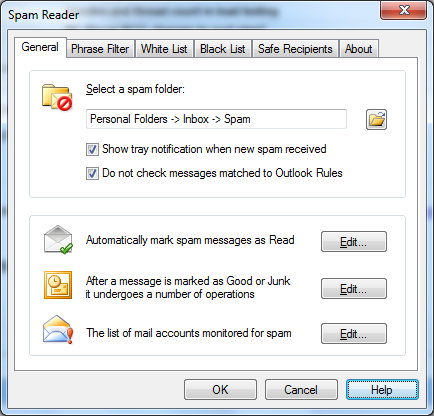
Spam Reader enables the user to set the interaction with Outlook Rules. By default, all incoming messages are first moved according to Outlook Rules. Spam Reader is filtering only those of them coming to "Inbox" folder. You can set the order of executing Outlook Rules and Spam Reader filtering on General Options tab of the program options. Marking "Do not check messages matched to Outlook Rules" checkbox you set Spam Reader to filter the incoming messages before they are checked by Outlook Rules. This option prevents chaotic movement of spam messages between special Spam folder and the destination folder defined according to Outlook Rules.

 Free Version
